Grips ReviewBeta von Grips IOby Grips IO

Das fehlende Tool für WBT-ReviewsThe missing tool for e-learning reviews E-Learning-Feedback auf den Punkt gebrachtE-learning feedback, right on the spot

Grips Review hängt deine Anmerkung genau an die Stelle im Kurs, die du angeklickt hast. Das klappt in Articulate Rise und Articulate Storyline. Du brauchst nur einen Link.

Grips Review attaches your note to the exact spot you clicked in the course. It works in Articulate Rise and Articulate Storyline. All you need is a link.

  • Der Pin sitzt auf Text, Bild oder Button
  • Ein Screenshot der Stelle ist automatisch dabei
  • Link im Browser öffnen. Kein LMS, kein Account nötig
  • The pin sits on text, image or button
  • A screenshot of the spot is saved automatically
  • Open the link in the browser. No LMS or account needed

Zugang anfragen Request access So funktioniert’sHow it works

Beta. Wir testen mit ausgewählten Kunden von Grips IO.

Beta. We're testing with selected Grips IO clients.

Illustration: eine Kursseite mit drei Kommentar-Pins und daneben die Kommentarliste von Grips Review. Illustration: a course page with three comment pins and the Grips Review comment list next to it.

Articulate Rise: die genaue StelleArticulate Rise: the exact spot

Nicht Lektion 3. Dieser Button.Not lesson 3. This button.

Ein Kommentar zu „Lektion 3“ schickt alle auf die Suche. Bei Grips Review sitzt er genau dort, wo du geklickt hast.

A comment that says “lesson 3” sends everyone searching. In Grips Review it sits exactly where you clicked.

Links ein Kommentar, der nur auf Lektion 3 verweist. Rechts ein Pin direkt auf dem Button in Lektion 3. Left: a comment that only points to lesson 3. Right: a pin right on the button in lesson 3.
  • Der Pin sitzt auf dem Teil der Lektion, den du angeklickt hast.
  • Wächst oder schrumpft der Inhalt darüber, bleibt der Pin auf seiner Stelle.
  • Jeder Kommentar speichert automatisch einen Screenshot.
  • The pin sits on the part of the lesson you clicked.
  • If the content above grows or shrinks, the pin stays on its spot.
  • Every comment saves a screenshot automatically.

Schnell dorthin, wo die Anmerkung istGet to the note's spot fast

Zur Stelle springenJump to spot Beta

Klick in der Liste auf einen Kommentar. Der Kurs öffnet sich so, wie die Person ihn beim Schreiben gesehen hat. In Storyline mit demselben Slide, denselben offenen Ebenen und demselben Zeitpunkt auf der Zeitleiste. In Rise mit der richtigen Lektion, bis zum Pin gescrollt.

Click a comment in the list. The course opens the way the reviewer saw it when writing. In Storyline: the same slide, the same open layers, the same point on the timeline. In Rise: the right lesson, scrolled to the pin.
Weiter, ohne zu wartenMove on without waiting

„Slide überspringen“ öffnet den nächsten Slide, auch wenn der Weiter-Button gesperrt ist. In Rise öffnet „Abschnitt überspringen“ den nächsten Abschnitt, auch wenn Rise erst nach dem Inhalt darüber weitermacht. Ist kein Abschnitt mehr übrig, öffnet „Nächstes Kapitel“ am selben Platz die nächste Lektion.

“Skip slide” opens the next slide, even when the Next button is locked. In Rise, “Skip section” opens the next section, even when Rise only continues after the content above. When no section is left, “Next chapter” takes the same spot and opens the next lesson.

Drei Schritte zum FeedbackThree steps to feedback

  1. Kurs hochladen.

    Upload the course.

    Dein Projektteam bei Grips IO lädt die SCORM-ZIP hoch. Das ist dieselbe Datei, die später ins LMS geht. Einen extra Export fürs Review brauchst du nicht. Ein Web-Export geht auch.

    Your Grips IO project team uploads the SCORM ZIP. It is the same file that goes into your LMS later. You need no extra review export. A web export works too.

  2. Link öffnen.

    Open the link.

    Du öffnest den Link im Browser. Dafür brauchst du kein LMS und keinen Account. Deinen Namen gibst du einmal ein.

    Open the link in your browser. You need no LMS and no account. You enter your name once.

  3. Klicken und schreiben.

    Click and write.

    Klick auf die Stelle, die du meinst: Text, Bild oder Button. Schreib deine Anmerkung. Fertig.

    Click the spot you mean: text, image or button. Write your note. Done.

Zeige auf das, was du ändern möchtestPoint at what you want to change

  • In Articulate Rise bleibt die Anmerkung an der Stelle, auf die du geklickt hast.
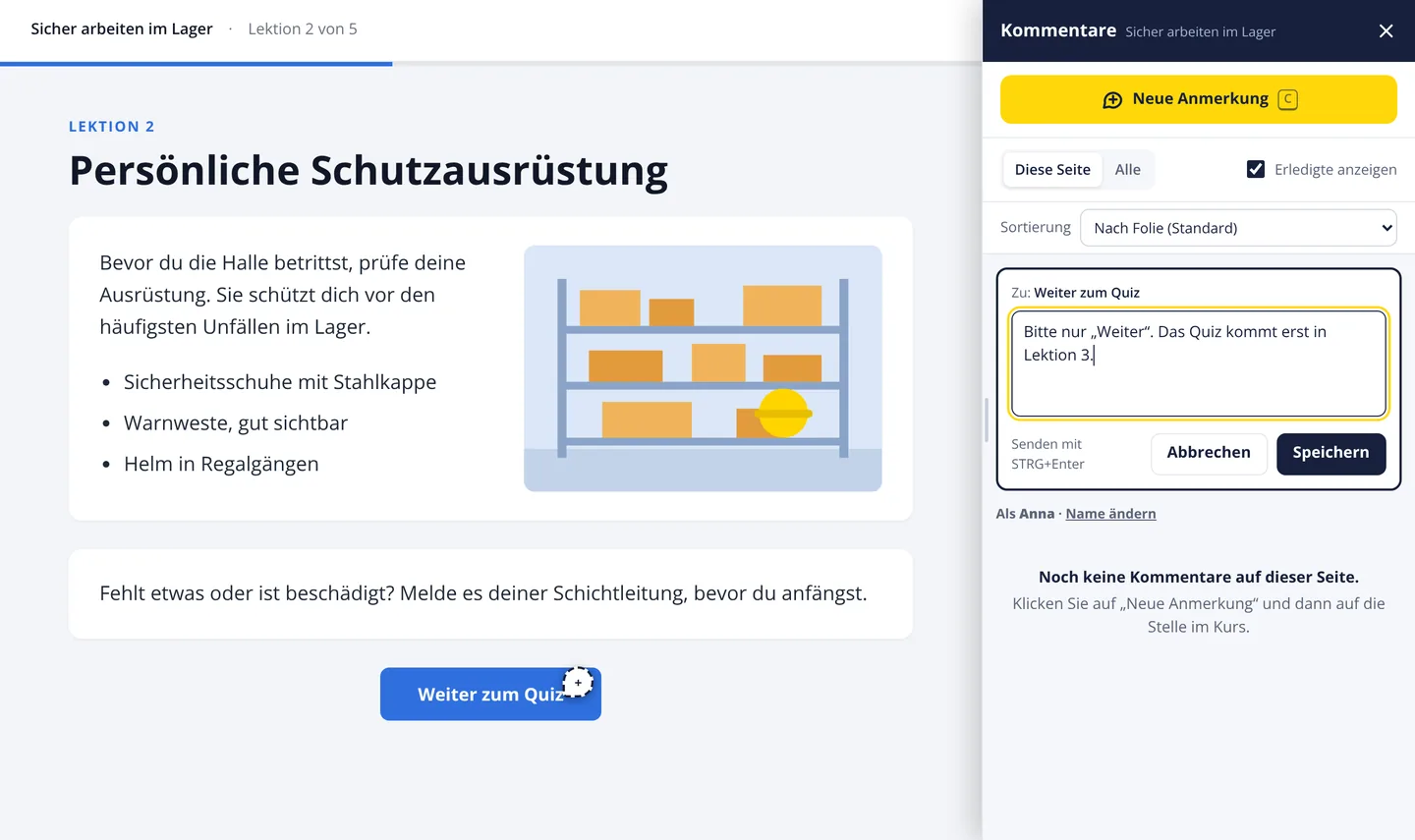
  • In Articulate Storyline bleibt sie am angeklickten Element, zum Beispiel Text, Form, Button oder Bild. Der Slide wird mitgespeichert, etwa „Slide 1.3: Titel“.
  • Zu jeder Anmerkung speichert Grips Review automatisch einen Screenshot der Stelle.
  • In Articulate Rise the note stays on the spot you clicked.
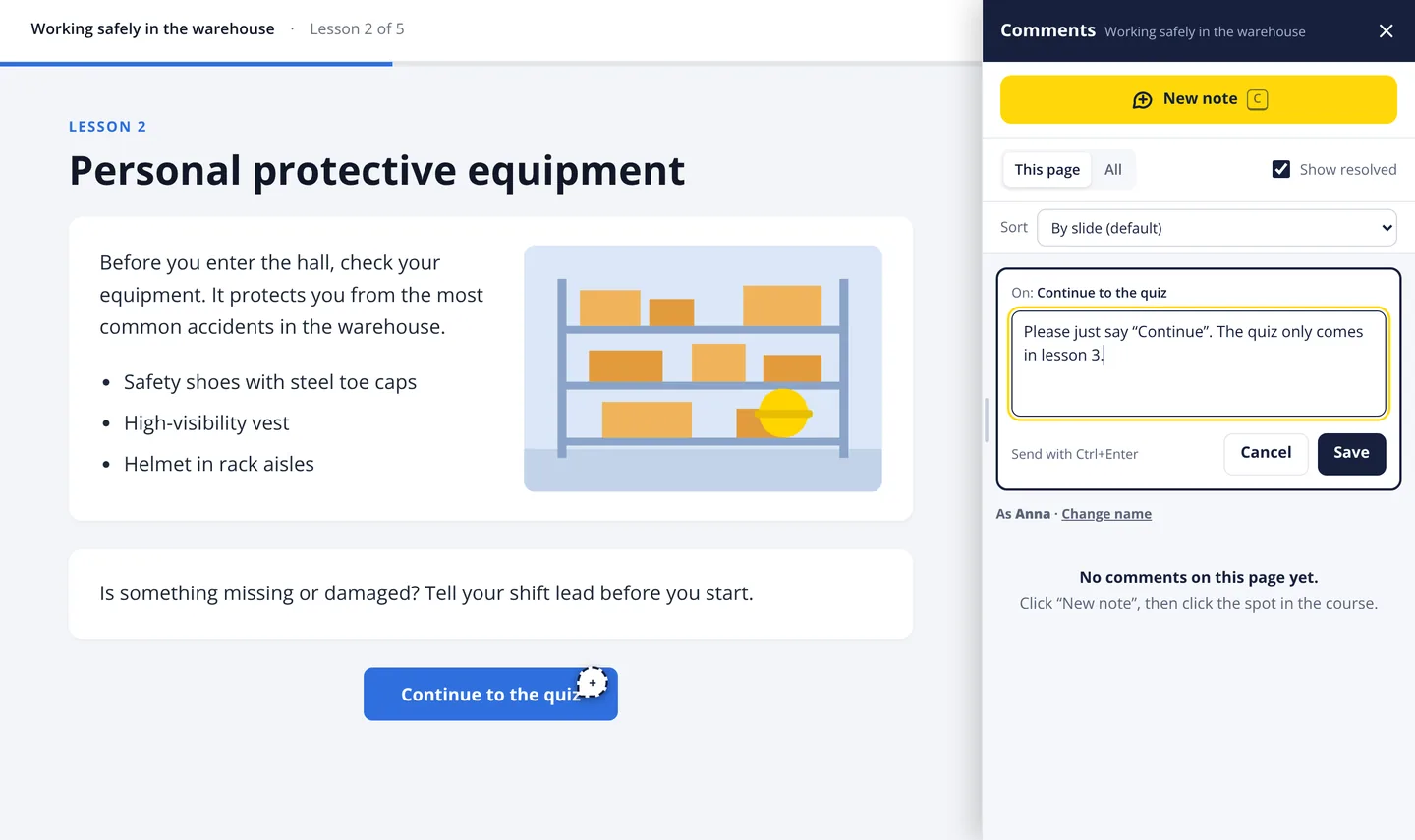
  • In Articulate Storyline it stays on the clicked element, such as text, shape, button or image. The slide is saved too, e.g. “Slide 1.3: Title”.
  • Grips Review saves a screenshot of the spot with every note.
Grips Review mit einem Beispielkurs: Der Button „Weiter zum Quiz“ ist markiert. Rechts steht die Anmerkung im Eingabefeld. Grips Review with a sample course: the button “Continue to the quiz” is marked, the note is typed into the field on the right.
Button anklicken, Anmerkung schreiben, speichern. Beispielkurs, zum Vergrößern antippen.Click the button, write the note, save. Sample course, tap to enlarge.

Professionelles Management von KommentarenProfessional comment management

Alle im Review sehen alle Kommentare, in der Reihenfolge des Kurses. Unter jedem Kommentar antworten Prüfende und euer Projektteam. So bleibt das Gespräch an der Stelle. Du kannst die Liste auch nach neuesten, ältesten oder ungesehenen Kommentaren sortieren.

Everyone on the review sees all comments, in course order. Reviewers and your project team reply under each comment. So the talk stays at the spot. You can also sort by newest, oldest or unseen.

Jeder Kommentar hat einen von vier Status:

Every comment has one of four statuses:

NeuNew
neu eingegangenjust received
RückfragenQuestion
wir haben eine Frage an dich, sie steht dabeiwe have a question for you; it is attached
AbgelehntRejected
wird nicht umgesetzt, der Grund steht dabeiwill not be done; the reason is attached
ErledigtDone
ist umgesetztdone

Neue Version, Kommentare bleibenNew version, comments stay

Grips IO lädt eine überarbeitete Version hoch. Deine Kommentare ziehen mit um. In Rise wandern sie an dieselbe Stelle, wenn es sie noch gibt. Ältere Versionen kannst du weiter ansehen.

Grips IO uploads a revised version. Your comments come along. In Rise they move to the same spot if it still exists. You can still view older versions.

Alles in einer Excel-DateiEverything in one Excel file

Du bekommst alle Kommentare in einer Datei, mit Screenshot, Status, Antworten, Version und Datum. So holt ihr Freigaben ein und seht, was noch offen ist.

You get all comments in one file, with screenshot, status, replies, version and date. Use it for sign-off and to see what is still open.

Zeit sparen bei umfangreichen ReviewsSave time on large reviews

„Siehe Lektion 3“ heißt: suchen, nachfragen, Screenshot nachreichen. Bei langen Kursen mit vielen Prüfenden kostet das jede Runde Zeit.

“See lesson 3” means searching, asking back, sending a screenshot later. In long courses with many reviewers, that costs time in every round.

So hilft Grips Review:

How Grips Review helps:

  • Jede Anmerkung steht an der Stelle, um die es geht.
  • Der Screenshot ist schon dabei.
  • Wer umsetzt, springt direkt zur Stelle.
  • Wer prüft, überspringt Wartezeiten und gesperrte Slides.
  • Every note sits on the spot it is about.
  • The screenshot is already attached.
  • Whoever fixes it jumps straight to the spot.
  • Reviewers skip narration waits and locked slides.

Gehostet in Köln, ohne TrackingHosted in Cologne, no tracking

  • Gehostet bei Grips IO in Deutschland (Köln)
  • Zufällige Kurs-Links, die niemand erraten kann
  • Optional: Passwort pro Kurs
  • Kein Tracking
  • Nicht von Suchmaschinen indexiert
  • Hosted by Grips IO in Germany (Cologne)
  • Random course links nobody can guess
  • Optional: password per course
  • No tracking
  • Not indexed by search engines

Beta mit ausgewählten KundenBeta with selected clients

Grips Review ist in der Beta. „Zur Stelle springen“ ist noch im Test und kann sich ändern. Du willst dabei sein? Schreib uns.

Grips Review is in beta. “Jump to spot” is still in testing and may change. Want in? Write to us.

Zugang anfragen Request access